Z-TEXT — Private Blockchain Messenger. No Phone. No IP. No Server.

What is Z-TEXT?

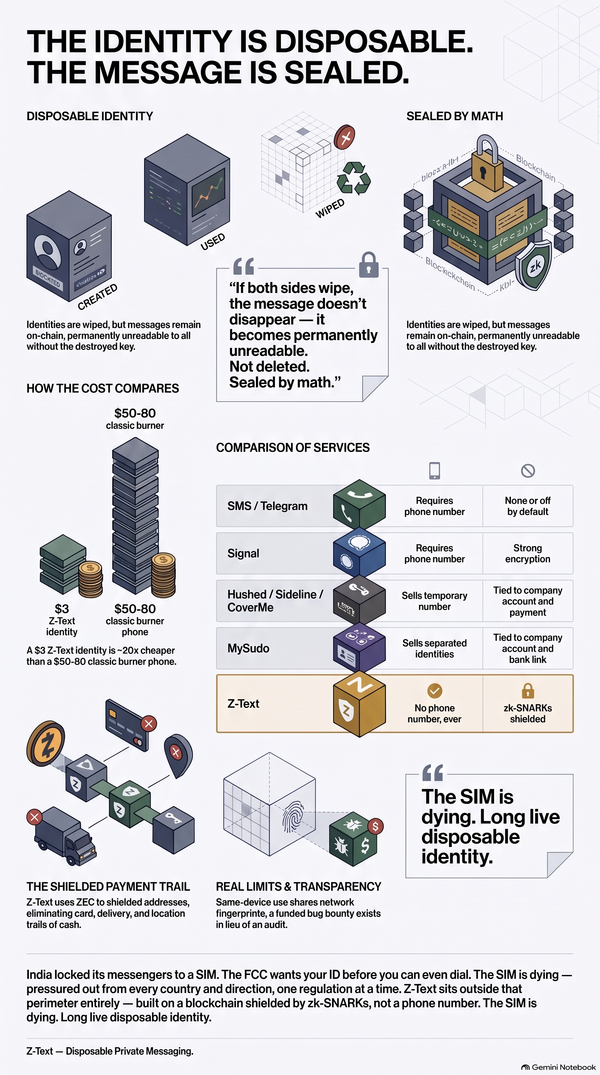
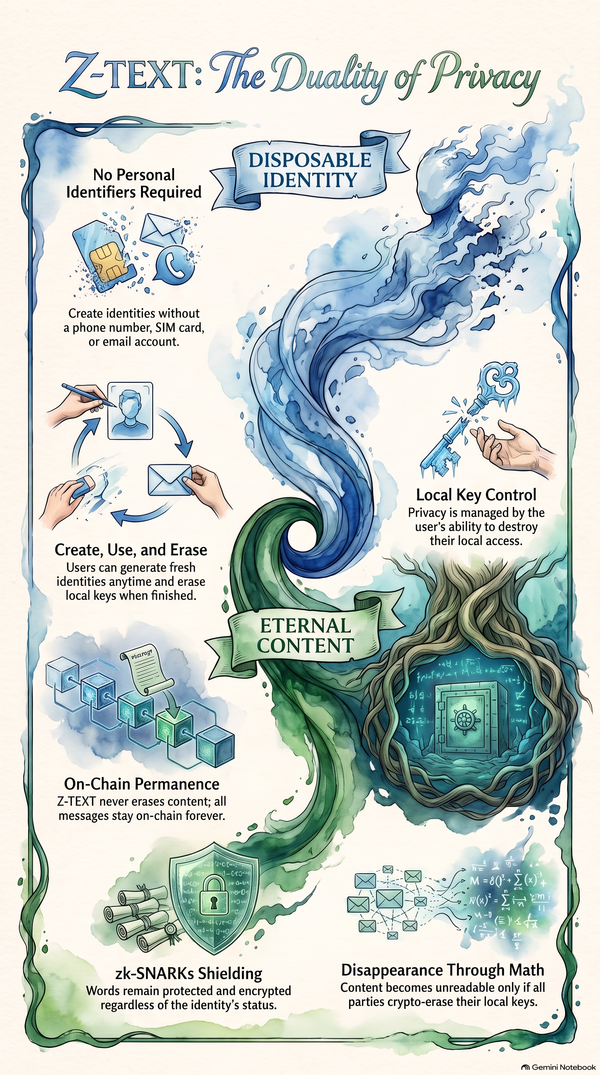
Z-TEXT is a private blockchain messenger with no phone number, no IP address, and no central server. Z-TEXT combines a shielded messenger, password manager, and crypto wallet in one app. Built on the BitcoinZ blockchain since September 10, 2017. Z-TEXT uses zk-SNARKs zero-knowledge proof encryption. No VPN needed. No Tor needed. Panic mode and stealth mode included. One 24-word seed phrase recovers everything. Message fee is $0.00003. Z-TEXT is the best private messaging app for journalists, activists, and crypto users.

Z-TEXT vs Signal vs Telegram vs WhatsApp

Signal requires a phone number. Telegram stores messages on central servers. WhatsApp shares your data with Meta. Z-TEXT requires no phone number, no email, no identity. Z-TEXT is the only censorship resistant messenger built on blockchain with zero-knowledge proof privacy.

Panic Mode Messenger — What It Is and Why You Need It

Z-TEXT · Blockchain Messenger · Est. 2017

Panic Mode Messenger.
What It Is.
Why You Need It.

One tap. Everything gone. That's not a bug. That's the feature.

Most messengers protect your messages
from people who aren't there.
Z-TEXT protects you from people
who are standing right in front of you.
That's what panic mode is for.

May 2026 · Z-TEXT Blog · Last verified: May 2026

⚡ Quick Verdict — Z-TEXT panic mode wipes the entire app in one tap. No mainstream messenger offers this. Built for journalists, activists, and anyone facing physical device threat.

The Definition

What Is Panic Mode?

Panic mode is a single-tap emergency feature in Z-TEXT that instantly wipes all app data from your device. Messages. Contacts. Keys. Everything. Gone in under one second.

It is designed for one specific scenario — when someone is about to physically access your device and you need to eliminate all evidence of your communications before they do.

But. Nothing is lost permanently. Because Z-TEXT is built on the BitcoinZ blockchain, your messages are stored on-chain — not on your device. Enter your 24-word seed phrase on any other device and everything comes back instantly.

The Users

Who Actually Needs Panic Mode?

More people than you think. Reporters Without Borders and Access Now have both documented the growing threat of device seizure as a tool of surveillance and persecution worldwide. Here's who panic mode protects.

📰

Journalists

A journalist's source list is their most sensitive asset. Border agents, police, and hostile actors have all been documented seizing phones to extract contact information. One tap of panic mode and the source list is gone. The blockchain remembers. The device doesn't.

Activists and Dissidents

In repressive regimes, a single message on your phone can mean prison. Activists at protests, checkpoints, or raids need the ability to eliminate evidence instantly. Z-TEXT panic mode was built specifically for this threat model. The Electronic Frontier Foundation calls this a critical gap in most privacy tools.

✈️

Frequent Travellers and Border Crossers

Border agents in many countries have the legal right to demand access to your phone. No warrant. No reason given. Panic mode lets you wipe Z-TEXT at the gate before handing over your device. Your messages survive on the blockchain. Your device shows nothing.

🔒

Privacy-Conscious Professionals

Lawyers, doctors, therapists, and business executives all handle sensitive communications. Device theft, workplace inspection, or family access to a phone are everyday risks. Panic mode gives any professional an instant clean slate — without losing a single message permanently.

Two Modes

Panic Mode vs Stealth Mode — What's the Difference?

Feature Panic Mode 🚨 Stealth Mode 👻
What it does Wipes all app data instantly Hides app from home screen
When to use Imminent device seizure Ongoing concealment needed
Data lost? Never — blockchain recovers all Nothing wiped — still accessible
Visible on device? App removed entirely No icon, no trace
Available in Z-TEXT only Z-TEXT only

But — and this is important — neither mode deletes your messages permanently. Z-TEXT stores all messages as shielded transactions on the BitcoinZ blockchain. Your 24-word seed phrase is the only key. The blockchain doesn't care what happens to your phone.

The Process

How Panic Mode Works — Step by Step

The whole point of panic mode is speed. Here's what happens in the seconds it takes to activate it.

1

You trigger panic mode

One tap on the panic button inside Z-TEXT. That's all. No confirmation dialog. No "are you sure?" No delay. Designed to work under stress in under one second.

2

Z-TEXT wipes everything locally

All local keys, cached messages, contacts, and app data are deleted from your device. The app removes itself. Your phone shows no trace of Z-TEXT ever being installed.

3

Your messages stay on the blockchain

Every message you ever sent in Z-TEXT is a shielded transaction on the BitcoinZ blockchain. That data doesn't live on your device. It lives on a decentralised network of nodes worldwide. Panic mode can't delete it — and neither can anyone else.

Recovery — when you're safe again

Install Z-TEXT on any device. Enter your 24-word seed phrase. Your full message history, contacts, and wallet return instantly from the blockchain. Exactly as you left them. Nothing permanently lost.

The Gap

Why Don't Signal or Telegram Have Panic Mode?

Because their architecture makes it impossible to implement properly. Signal and Telegram store message history on your device AND on central servers. Wiping your device doesn't wipe the server. A determined attacker with a subpoena can still recover your messages. And without blockchain recovery, a local wipe means permanent loss.

Panic Mode — Who Has It?

Z-TEXT ✓ Full panic mode + blockchain recovery
Signal ✗ No panic mode
Telegram ✗ No panic mode
WhatsApp ✗ No panic mode
Session ✗ No panic mode
Briar ✗ No panic mode

Common Questions

People Also Ask

What is panic mode in a messaging app?

Panic mode is a single-tap emergency feature that instantly wipes all app data from your device. In Z-TEXT, panic mode deletes all local keys, messages, and contacts in under one second. Because Z-TEXT stores messages on the BitcoinZ blockchain, nothing is permanently lost — your 24-word seed phrase recovers everything.

Does Signal have panic mode?

No. Signal does not have a panic mode feature. Signal stores message history on your device and on central servers. Wiping your device does not remove data from Signal's servers. Z-TEXT is currently the only consumer messenger with a dedicated one-tap panic mode backed by blockchain recovery.

What is stealth mode in Z-TEXT?

Stealth mode hides the Z-TEXT app completely from your device home screen. No icon appears. No notification badge shows. No trace of the app is visible to casual inspection. It is designed for ongoing concealment in environments where even the presence of a privacy app can attract attention.

Can I recover messages after using panic mode?

Yes. All Z-TEXT messages are stored as shielded transactions on the BitcoinZ blockchain — not on your device. After using panic mode, reinstall Z-TEXT on any device, enter your 24-word seed phrase, and your full message history returns instantly. Panic mode only wipes the local device copy.

Final Verdict

One Tap. Everything Gone. Nothing Lost.

Panic mode isn't a gimmick. It's the answer to a threat that Signal, Telegram, and WhatsApp architecturally cannot solve — physical device access. Z-TEXT built panic mode because the blockchain makes it possible. Your messages don't live on your phone. They live on the BitcoinZ blockchain, protected by zk-SNARKs zero-knowledge proofs, recoverable only by your 24-word seed phrase.

Wipe the device. Keep the conversation. That's Z-TEXT.

"Privacy that disappears on command — and returns when you're ready."

🔗 Also read:   Signal vs Z-TEXT  ·  Shielded Messenger  ·  zk-SNARKs Guide  ·  No Phone No IP No VPN  ·  Best Messenger No Phone

🚨

Ready for real protection?

No Phone. No IP. No VPN. No TOR. Just Z-TEXT.

👉 Get Your Licence Now

z-text.com  ·  BitcoinZ  ·  Packages

Meta description: Panic mode in a messenger wipes everything in one tap. Z-TEXT has it. Here's what it is, who needs it, and why no mainstream app offers it. 2026 guide.

Read more